
Changes, everything changes eventually – and people will instantly dislike the changes simply because they are different.
I tend to look at a new website and complain less about aesthetics, than about functionality. I don’t really care about aesthetics – whereas most other people complain about the change in colour scheme or fonts.
Today, I shall rant like mad about the aesthetics.
Overnight, while witches roamed the night sky during All Hallows Eve, demons at Google made changes to their Google Reader web tool.
As a fairly heavy web user, I tend to get about 80% of my website content via RSS feeds – so for me a tight fast RSS reader is essential. And until now, Google Reader, while lacking in some functionality I wouldn’t mind having was aesthetically very fast to use.
The text is tight and I can scan down a page of text very quickly to see what is relevant to my work (or social interests). It was fast.
Overnight, they applied a new aesthetic, which fits into the current “white space” worship that says if some white space on a screen is good, them more must be better.
The net result is two fold.
Firstly, there is about a quarter less content on the screen than before – and if I have 200 headlines to scroll through, it will take more clicks of the “page down” button to get to the end. It’s slower!
The other one is more fundamental about web font/typography, and is probably more serious. There is a lot of padding between each line of text and as a result I have already noticed some eye strain trying to scroll down the page of text.
I think I can work out what they were thinking, and they look as the RSS headlines as “headlines”, which indeed should be given a decent amount of padding, but for me (and judging by the comments on their help pages, I am not alone) this is not a really collection of disparate headlines, but a page of text I am scanning down.
You
Do
Not
Expand
A
Sentence
Like
This
Compare the two images below – one I took from my PC this morning, and the other found on “the internet” as a screenshot of the older design – which amusingly comes from Matt Cutts website.

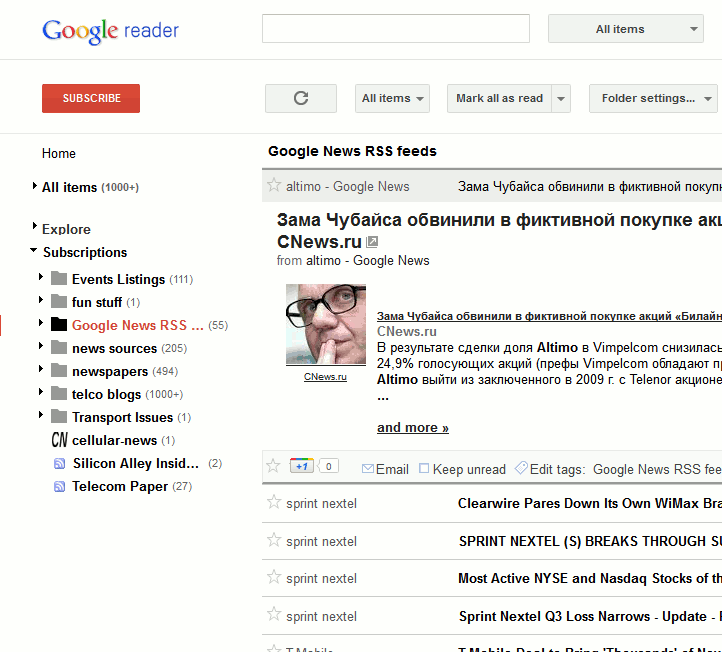
OK, the new design might be more “modern”, but there is so much space wasted around the edges etc – but the main problem for me at least, is how much space is between each of the headlines in the main RSS feed window.
Aesthetically, I tend to dislike how the main message seems to blend in with the rest of the design instead of standing out as the old version seems to – maybe it just needs a line around the open window?
However, to design a text based tool with so much line padding between each line of text in the main RSS window is functionality wise, deeply flawed.
Sadly, there isn’t a “classic mode” option in the website that users can click to get to the older tighter text interface.
Rant over (for now), while I ponder whether it is time to change to a different RSS reader. It is too important a tool for me to have this sort of problem persist.
Update: If you use Greasemonkey (and I didn’t until this morning) and Firefox/Chrome, then this script kills most of the whitespace in the most important main reading pane. Makes things MUCH better again.



Do let us know if you find a better solution – it really is awful on the eye, both the huge gaps between headlines but i’m finding even more that the way the main message doesn’t stand out from the rest of the content, as you say, even a line round it would be nice
I’ve had issues with the functionality too – sometimes, UI elements appear almsot entirely off the bottom of the screen, so I can’t see what they actually are.
Agreed with all of the above. And where has the Share button gone? I share non-Egyptology related archaeology items to a widget on my Egyptology News blog and in spite of the help pages saying that there is now a non-intuitive button at the top right I simply cannot see it! Invisible is certainly non-intuitive. My archive of shared items has also vanished, although the Help pages claim that there is a way of retrieving them. What a hopeless user experience.
Thanks for the Help link, by the way. The tidal wave of outrage is rampant. Google really have messed up with this.
I’ve added a bit of colour to the linked GreaseMonkey script, which you may find useful – http://blog.joda.org/2011/11/my-google-reader-fix.html
i just want my colored reader greasemonkey script to get updated. can’t stand all white lines!!! i have way too many rss feeds for that.
I used to switch between Google Reader (for tech headline browsing) and Feedly for Chrome (for feeds with more graphics like design/art). With all that wasted white space (RSS is for reading headlines) I’m now reading all my Google Reader feeds in Feedly. Might be worth a try.
Also annoyed that they took away the share option, used that to feed automatically into WordPress.
I too use Google Reader but I’ve never really used the web version. I use an app for my phone and Mac called Reeder. It turns RSS feeds into something beautiful. I monitor several hundred feeds and it never misses a trick.
Try using Feedly.com ?
It’s browser based – while I want website based service.
(it also has a website that is rather light on facts about itself)
I’m having a basic tech issue with it. Clicking ‘all items’ isn’t doing anything. I’ve tried it in Chrome and Safari with no success. (I did find a way to list all items yesterday, but can’t remember how.) Dimbo M@.
Hmm, that option is working for me – but the whole site seems sluggish at times since the revamp.
You use the page down button to scroll?! No wonder your eyes get tired! That is what the spacebar is for. It jumps a whole page at a time meaning your eyes don’t follow the screen up and down as you scroll.
By the way this works in most PDF viewers, Word and plenty of websites as well.
Sounds like the page-down and space bar do exactly the same thing then – jump down a page at a time.
Edit – having tried it, the space down bar just moves down one item at a time and opens it – whereas page down jumps down a whole page at a time.
In other words, I was doing it correctly all along.